

Manage Security Groups in a organizational Strcture
As in on of my last post I’ve showed you my approach to manage distribution groups in the hierarchical structure of an ActiveDirectory installation. In the mean time I’ve adapted a similiar approach for the security groups.
Here is an example of the structure:

ADFS Login Customization
The purpose of this article is to show the intention and implemention of the most common modifications for the ADFS login page.
Out of the box the login form should look like this:
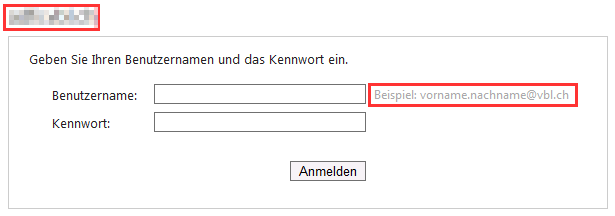 The f.e. is by default the page url, this can confuse the user, due they expect something like “your login” or “Office365 Login”.

Kinaj 23 - The Taste of Kiwi (House)

Archive ActiveDirectory Users and their Mailbox
One of my company’s requirements is the retention time of 10 years for user accounts and their mailbox data, I have to admit, this might not be common or even recommended. However I have to deal with it.
One problem to face is the availabilty of user account names, by the number of about 500 employees there’s a hight change that two or even more people are having the same name.
To clean up the available names in the system I’ve written a script that renames a users identity and the mailboxes address. So let’s see what this script does:
SharePoint File Reporting Done Right
To know what type of information a SharePoint Installation is holding could get more difficult as the platform grows.
To set quota templates on the site collection is a good way to keep an eye on the SharePoint storage, but it doesn’t’ show the real used storage.
In case versioning for files is enabled and/or the users don’t check in their files properly these files using space without let you know.

Kinaj 22 - Robot Unicorn (progressive house)

Kinaj 21 - It’s a Trap (trap)

Project: Setup Windows 7 Kiosk
The goal of this project is a simple Windows 7 Kiosk installation with nothing else as the newest version of internet explorer installed. A user should not be allowed to do something than can malfunction the system or even elevating the user privileges. I want to show you in this post which GroupPolicies I’ve used and what configurations I made to set up this type of installation.
First I want to commit my principles for working with ActiveDirectory and Group Policies:
Manage access rights to the Office365 portal
In addition to my last script showing how to manage the user licenses in Office365 I’ve written a new script for assign, remove or replace the access rights in the office365 portal.
The script has the same structure as the license management script, feel free as always to copy and alter this script or asking me questions about it.